CGMZ - Crafting
Latest Update: November 19, 2021
Version: 1.2.2
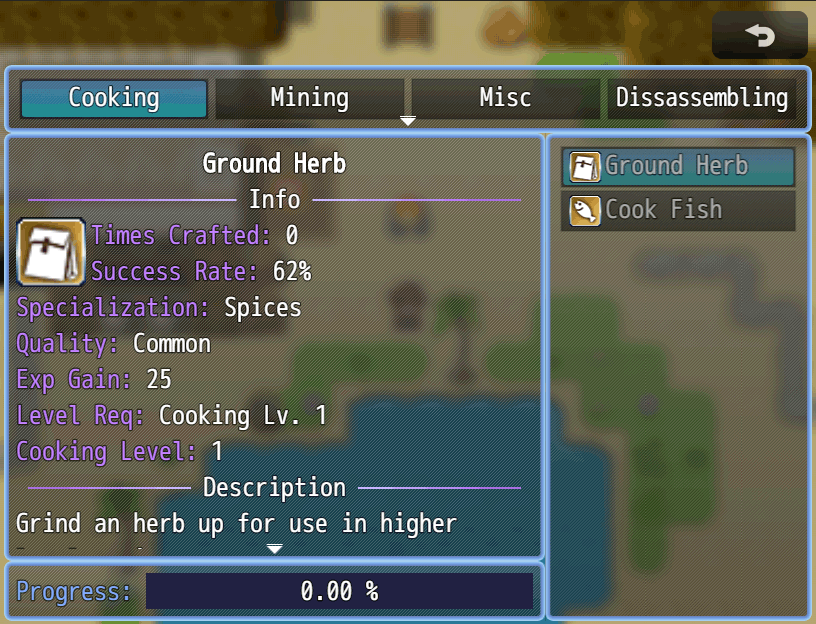
Adds a crafting system to your game that works well with CGMZ Professions. It can handle item requirements (consumed on craft), tool requirements (not consumed on craft), products (produced on craft success) and fail products (produced on craft fail). Recipes can be discovered by using an item or via plugin command.
- Crafting system with ingredients, tools, fail products, and success products
- Works well with CGMZ Professions
- Learn recipes on level up, item use, or plugin command


Press F3 to switch fullscreen display mode
Press F4 to go fullscreen
Forum post on RPG Maker Web can be found here: RPG Maker Web Forum
Forum post on RPG Maker Central can be found here: RPG Maker Central Forum
Required: CGMZ Core. This is the Core CGMZ Plugin which is required by CGMZ plugins.
Suggested: Professions. For a profession system that works well with this crafting system.
Suggested: Toast Manager. For popup windows when learning a recipe
Import into plugin manager and enable the plugin. Some customization options available. Further instructions in plugin.
Terms for this plugin and all resources on this site can be found at: Terms of Use
- Initial release
- Made it easier to select items/armors/weapons for crafting recipes
- Fixed crash if recipe had no toast SE but Toast Manager was imported
- Added option to hide the percentage text on the progress window
- Made the recipe list refresh after every craft
- Added option to show the current supply of ingredients in craft window
- Rearranged the recipe parameter to show the name first
- Added ability to use gold as ingredient, tool, fail product, or product
- Added ability to increase success change by equipment
- Added ability to increase success chance by profession level
- Added option to close crafting scene on profession level up
- Added option to use your own background image for the scene
- Added option to make the windows transparent
- Descriptions and item names now compatible with text codes such as \c[x]
- Added ability to use custom icon image in place of big icon in display window
- Added option to show a confirmation window before crafting
- Added option to change label text color
- Added plugin command to set a recipe's description
- The display window now shows the current profession level
- Changed the Call Scene plugin command. You can now input multiple professions to include more than 1 type in the scene
- New recipes should be automatically recognized on saved game load
- Compatibility with CGMZ Profession profession level buffs
- Fixed bug with click to craft for windows that don't scroll
- Fixed bug when using cgmz professions but a recipe doesn't have a profession
- Fixed bug with back button on non-scrolling display window
Support Casper Gaming and get some extra goodies on Patreon:

Join the Discord community for support and more:

Bored and want to see a random plugin?
Click here